Panorama-Sphere
The type Panorama-Sphere describes the capture center of a spherical panorama for PlexMap Street360°. All relevant information, such as camera position and camera orientation, is stored within it.
An object of type Panorama-Sphere must contain the image capture name ImageId as an attribute, as well as the attributes Heading, Roll, Pitch, and HeightOffset. The panoramic image associated with each capture center can be imported via type File and stored together with the panorama-sphere in a single layer for processing. For this, a 360° panoramic image in equirectangular projection (Equidistant cylindrical projection) is required.
| Attribut | Funktion |
ImageId (string) | Image name of the panorama |
Heading(float) | Rotation around the positive z-axis (H+Z) |
Pitch(float) | Rotation around the negative x-axis (P-X) |
Roll(float) | Rotation around the negative y-axis (R-Y) |
HeightOffset(float) | Vertical displacement (offset) of the panorama center point |
CreationTime(string) | The timestamp of the image capture is displayed in the "attribution" section, if set (optional) |
(optional)AngleAxisMapping (string) | Defines the sequence, axis selection, and signs of the "Heading", "Pitch", and "Roll" values for the transformation from panorama to East-North-Up (ENU) coordinates. You can also determine this value using our calibration tool. Please contact our support for assistance. |
Configuration of the data type Anchor
1. Definition of the rotation axes (Local camera data)
These values describe the orientation of the camera at the time of capture relative to the vehicle:
Heading (yaw angle):
The viewing direction of the vehicle (e.g., 0° = North).
Describes the horizontal rotation around the vertical axis. A heading of 0° means the camera is looking exactly North. Positive values describe a rotation of the vehicle to the left (West). In mapping, the heading ensures that the panorama is geographically aligned to the north.
Pitch (pitch angle):
The inclination of the camera upwards (positive) or downwards (negative). Describes the inclination along the transverse axis. A positive pitch value means the vehicle nose is pointing upwards (uphill driving). Mapping compensates for this inclination so that the horizon remains level in the viewer.
Roll (roll angle):
The lateral tilt of the camera (positive = right tilt). Describes the tilting around the longitudinal axis. A positive roll value means the vehicle is leaning to the right. Mapping corrects this tilt so that the image does not appear "tilted" in space.
2. The coordinate change:
From the vehicle to the reference system (ENU)
The camera is permanently mounted on the vehicle. To ensure that the panorama appears accurately positioned on the map in the viewer later on, we must transform the local camera movements into the global East-North-Up (ENU) system.
In this process, the projection sphere is placed in space in such a way that it reflects the actual orientation at the time of capture. Only when the sphere is correctly "adjusted" in the ENU system can the user later orient themselves seamlessly between the map and the panorama in the viewer.
3. The global recerence system (ENU)
In this right-handed system, the axes are fixed as follows:
X-axis (East): Points East.
Y-axis (North): Points North.
Z-axis (Up): Points vertically upwards.
4. Spatial placement of the projection sphere
In this step, the sphere is fixedly oriented in space. This does not refer to the subsequent user control (looking around), but to the initial adjustment of the "canvas". To ensure that the image content (e.g., a church tower in the north) is also located in the north within the digital twin, the sphere must be placed in space based on the sensor values.
5. Direction of rotation and mapping logic for placement
For mapping in the Switchboard, the following applies: Positive angular values position the sphere by a clockwise rotation around the respective axis of the ENU-System.
To align the sphere congruently with the real environment, the following standard mapping is applied:
| Parameter | Mapping | Wirkung auf die Platzierung |
Heading | H+Z | Aligns the sphere horzontally (rotation around Z). |
Roll | R-Y | Compensates for the lateral tilt via the longitudinal axis (Y). |
Pitch | P-X | Compensates for the inclination (up/down) via the transverse axis (X). |
6. The two worlds of rotation
These are two diefferent coordinate systems that must be linked via the AngleAxisMapping in the Switchboard.
The Extrinsic world: The vehicle on the road (outside)
In the real world, the vehicle moves within a fixed reference system. The vehicle has sensors (IMU, GPS) that measure this movement. These sensors often think extrinsically because they relate to the fixed world:
- The fixed world system (e.g., ENU): North (Y) is always North, East (X) is always East, Up (Z) is always Up.
- The measurement: The sensor says: "The vehicle is rotated 45° to the left (Heading around Z)". If the vehicle then tilts 20° upwards on a steep slope (Pitch), this rotation (for the sensor often) still occurs around the fixed, stationary East-West axis of the world, regardless of which cardinal direction the car is currently facing.
Die Intrinsic world: The projection sphere in the viewer (inside)
In the viewer, we want to display this panorama. We have a virtual sphere onto which the image is mapped. The viewer sits at the center. To correctly "anchor" this panorama in ENU space (aligning it to North, leveling the horizon), we must rotate this sphere.
- The rotating local system (Intrinsic): When we rotate the sphere in the Switchboard, we use the AngleAxisMapping. This operates intrinsically. This means: The rotation axes are attached to the sphere.
The process: If we first rotate the sphere by 45° (H), its own transverse axis (X') moves with it. The next rotation (P) then takes place around this already rotated, new axis.
7. The config
- The sensor (Outside) provides us with angles for rotations around fixed axes (X, then Y, then Z).
- The viewer (Inside) performs rotations around rotating axes.
To transition from the extrinsic world of the sensor to the intrinsic world of the sphere, we must utilize mathematical equivalence.
The golden rule: An extrinsic rotation around the fixed world axes in the sequence H->P->R leads to the exact same result as an intrinsic rotation around the rotated local axes in the sequence R->P->H.
ImageId Anchor
This value describes the image name. The panorama spheres are assigned to the panoramic image files via ImageId (string). The panorama-sphere data type requires an equirectangular panorama as an image file. Shown on the right is a simplified equirectangular panorama featuring a house, a lake, and a tree. Using this image, the attributes Heading, Pitch and Roll iwill subsequently be explained in the respective adjacent images.

Heading Anchor
This attribute contains the angle in degrees, which specifies the rotation around the negative z-axis in the ENU system (EastNorthUp). Heading (float) is also referred to as yaw or lurching in the body-fixed coordinate system.The angle indicates the deviation of the panorama image center from the North direction. For example, if the center of a panoramic image were oriented exactly toward the East, the Heading would be exactly 90°. |

Pitch Anchor
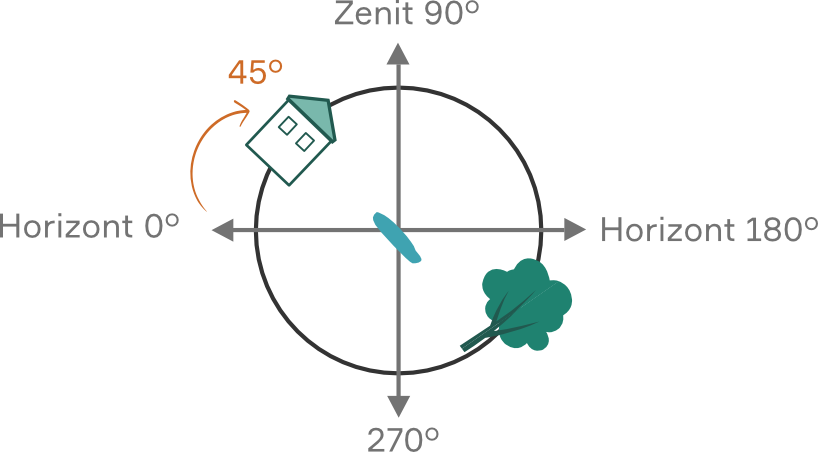
This attribute contains the angle in degrees, which specifies the rotation around the negative y-axis in the ENU system (EastNorthUp). Pitch (float) is also referred to as pitching around the transverse axis in the body-fixed coordinate system.
The angle indicates the deviation of the panorama image center from the horizon.
For example, if the center of a panoramic image were located exactly at the zenith, the Pitch would be exactly 90°.
Roll Anchor
This attribute contains the angle in degrees, which specifies the rotation around the x-axis in the ENU system (EastNorthUp). Roll (float) is also referred to as rolling or swaying around the longitudinal axis in the body-fixed coordinate system.
The angle indicates the deviation of the horizon in the panorama from the actual horizon in PlexMap 3D.
For example, if Roll were at 90°, viewers would have to watch the spherical panorama lying on their right ear to see the image correctly aligned.

HeightOffset Anchor
The optional value HeightOffset (float) is used to change the panorama center point.
Panorama images are displayed in PlexMap 3D as points in a 3D map. By clicking on one of these so-called activation points, a panoramic image is opened. Spatially, these activation points initially always correspond to the panorama center.
In some cases, however, it may be useful to move the activation point, for example, slightly downwards so that it lies perfectly on a street. In this case, the activation point is moved downwards by, for example, two meters using the function Translate. To ensure that the panoramic image is still correct, the panorama center must now be moved upwards by two meters. The HeightOffset value is used for this purpose. In the example described, you would set HeightOffset to "2" to shift the panorama center upwards by two meters.